Minisopuru 193G Review 2026: Dual HDMI USB-C Hub
Disclosure: This post contains affiliate links. If you buy through them, we may earn a small commission at no extra cost to you.
If your laptop has one USB-C port and your desk has two monitors, you need a hub that bridges the gap without turning into a cable mess. The Minisopuru 193G is a compact 6-in-1 USB-C hub built for exactly that job: two HDMI outputs, three USB-A ports and a 100W-rated USB-C Power Delivery port in one aluminum body. In this review, we look at what the Minisopuru 193G offers, where it falls short, and who will get the most from it. It is aimed at remote workers, students and anyone who wants a bigger workspace on a modest budget.
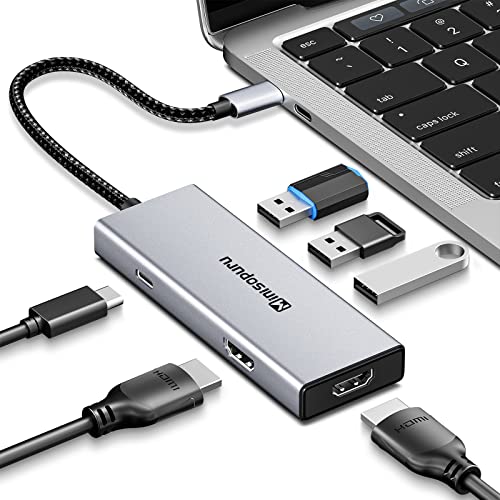
Table of Contents
- Minisopuru 193G Overview
- Design and Specifications
- Real-World Usage with the Minisopuru 193G
- Drawbacks and Limitations
- How It Compares to Other Docking Options
- Who Should Buy the Minisopuru 193G
- Current Deal and Coupon
- Price and Where to Buy
- FAQ
- Final Verdict
Minisopuru 193G Overview
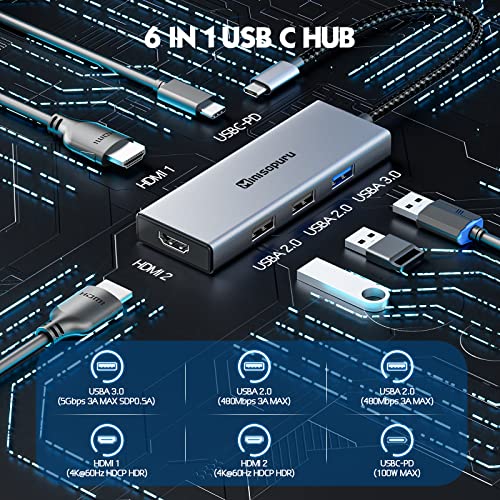
Minisopuru is a brand that focuses on USB-C hubs, docking stations, stands and related desk accessories. The 193G (model number BD193G) sits in the entry-level end of that range. It is sold as a 6-in-1 USB-C dual HDMI hub, and the “6” refers to its six ports: two HDMI outputs, one USB 3.0 port, two USB 2.0 ports and one USB-C Power Delivery port.
The pitch is simple. You plug a single USB-C cable into your laptop and gain a second display, a few USB-A ports for accessories and a way to keep your laptop powered. The manufacturer says it works without any driver installation, which makes setup about as easy as it gets for a multi-monitor adapter.
Here is what stands out on paper:
- Dual HDMI output for two external monitors from one USB-C port.
- Up to 4K@60Hz per the manufacturer, under the right source conditions (DP 1.4).
- USB-C Power Delivery rated up to 100W.
- Plug and play with no driver required.
- Aluminum housing in a space gray finish.
Design and Specifications
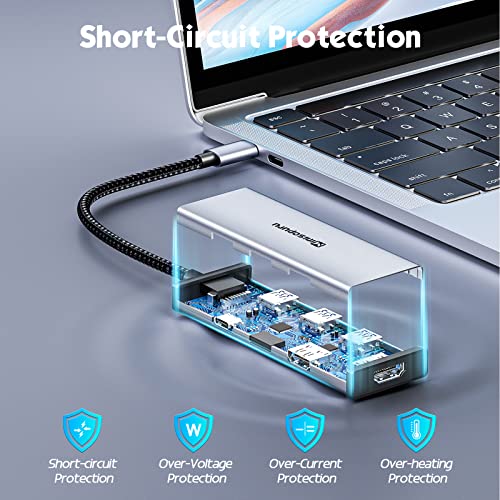
The Minisopuru 193G uses a precision-milled aluminum shell rather than plastic. That matters for two reasons. It looks at home next to a MacBook or a slim Windows ultrabook, and metal helps spread heat when several ports are active at once. The brand also says the hub uses an intelligent protection chip so it stays safe when all six ports are in use.
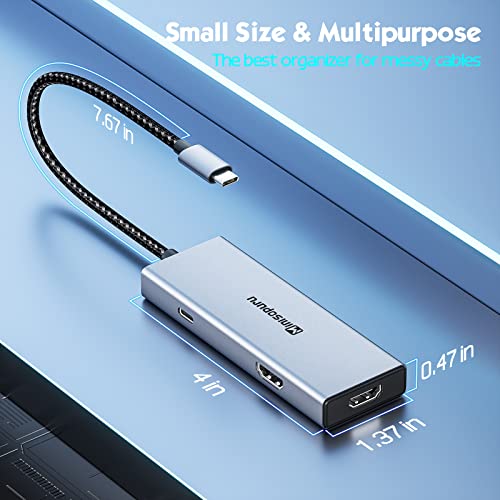
At roughly 5.0 x 2.6 x 0.7 inches, it is small enough to slip into a laptop bag. It is not a full desktop dock, and it does not pretend to be.
| Feature | Minisopuru 193G |
|---|---|
| Model number | BD193G |
| Video outputs | 2 x HDMI |
| Maximum resolution | Up to 4K@60Hz per manufacturer (DP 1.4 source) |
| USB-A ports | 1 x USB 3.0 (5Gbps), 2 x USB 2.0 (480Mbps) |
| Power Delivery | 1 x USB-C PD, up to 100W |
| Driver required | No (plug and play) |
| Body | Aluminum, space gray |
| Dimensions | 5.0 x 2.6 x 0.7 inches |
The mix of one fast and two slow USB-A ports is worth noting. The USB 3.0 port is the right spot for an external drive or a fast flash drive, while the two USB 2.0 ports are better suited to a mouse, keyboard or other low-bandwidth accessories.
Real-World Usage with the Minisopuru 193G
This section is based on the manufacturer’s published specifications and product details, so treat it as a guide to what daily use should look like rather than a lab test. Your results will depend on your laptop’s USB-C port, your cables and your monitors.
For a typical workday, the Minisopuru 193G handles the job it was made for. Connect your two monitors over HDMI, plug in a keyboard and mouse, and you have a proper desk setup from one cable. Because there is no driver to install, switching between a work laptop and a personal one is mostly a matter of moving the USB-C cable.
The 100W-rated Power Delivery port is useful if you want to keep your laptop charged while the hub is connected. As always, match your charger to your laptop’s needs, since the wattage you actually get depends on the charger you supply and on your laptop.
One important detail applies to anyone with a Mac. The manufacturer states that, because of macOS limitations on this type of hub, you get mirror mode only, so two different extended screens are not possible. On Windows, the hub supports both SST and MST modes, which is where the dual-monitor design really pays off.
Compatibility is broad on paper, covering many USB-C laptops and tablets, but there is a condition. Your device’s USB-C port must support video output (DisplayPort Alt Mode). If it does not, no hub can add monitors through that port.
Drawbacks and Limitations
No budget hub is perfect, and the Minisopuru 193G has trade-offs you should know about before you buy.
- Mac users cannot extend two displays. The brand itself notes that only mirror mode works on macOS. This is the biggest limitation for MacBook owners.
- Dual 4K@60Hz is demanding. The headline resolution depends on your laptop’s video output, and many laptops cannot drive two 4K screens at 60Hz through a single USB-C port. Check your laptop’s specs first.
- Only one fast USB-A port. Two of the three USB-A ports are USB 2.0, so they are not ideal for external SSDs.
- No Ethernet or SD card reader. If you need wired networking or card transfers, you will need another adapter or a larger dock.
- Stock can vary. Availability changes from time to time, so check the current status before planning a purchase around it.
How It Compares to Other Docking Options
Rather than pit the Minisopuru 193G against a single rival, it helps to compare it with the two main alternatives most buyers consider: a Thunderbolt-style dock and a DisplayLink-based dock.
| Option | Best for | Trade-off |
|---|---|---|
| Minisopuru 193G | Windows users who want two HDMI monitors, simple setup and a low price | Mirror-only on Mac, limited USB speeds, no Ethernet |
| Thunderbolt-style dock | Power users who need very high bandwidth and many ports | Usually much more expensive and larger |
| DisplayLink-based dock | Mac users who want extended dual displays | Needs a driver install and can use more CPU |
In short, the Minisopuru 193G wins on price, size and simplicity. It loses on flexibility. If you want extended dual screens on a Mac, a DisplayLink-style dock is the more suitable category. If you need top-tier speeds and a lot of ports, a Thunderbolt dock is the safer pick. The same brand also lists DisplayLink and Thunderbolt docks in its range, so you can stay within one brand if you outgrow this model.

Who Should Buy the Minisopuru 193G
The Minisopuru 193G makes the most sense for these buyers:
- Windows laptop users who want two external monitors from a single USB-C port.
- Remote workers and students who need a portable, low-cost way to expand their workspace.
- Anyone upgrading from a basic dongle who wants more ports and dual-screen support in one device.
- Travelers who want a compact hub that fits in a laptop bag.
You should probably skip it if you use a Mac and need two different extended screens, if your laptop’s USB-C port does not support video output, or if you rely on Ethernet or a card reader every day.
Current Deal and Coupon
Looking for a discount on the Minisopuru 193G?
We keep a coupon page for Minisopuru so you can check whether a code or promotion is available. Offers, percentages and dates change from time to time, and some promotions end without notice, so please confirm the terms on the page before you check out.
Price and Where to Buy
At the time of writing, the Minisopuru 193G was listed at about $39.89 USD on the brand’s own store, and prices can change. That puts it at the budget end of dual-HDMI hubs, especially compared with full Thunderbolt docks that often cost several times as much.
Buying direct from the brand is usually the safest route for warranty and support, and the brand lists a US warehouse for faster shipping to American customers. Shipping options and stock levels vary by region and over time, so check availability before you decide. Using the coupon page above first is a simple way to see whether any savings apply.

FAQ
Does the Minisopuru 193G need a driver?
No. The manufacturer describes it as plug and play, so you should not need to install software on a supported device.
Can I use two extended monitors on a MacBook?
Not with this hub. The brand states that macOS limits this type of hub to mirror mode, so two different screens cannot be extended. Windows laptops support both SST and MST modes.
Does it support 4K at 60Hz?
The manufacturer lists up to 4K@60Hz on both HDMI ports under a DP 1.4 source. Real-world results depend on your laptop’s video output, so check your device’s specifications first.
How much power can the USB-C port deliver?
The USB-C Power Delivery port is rated up to 100W. The power your laptop actually receives depends on the charger you use and your laptop’s requirements.
What can I plug into the USB-A ports?
Mice, keyboards, phones, tablets and drives all work. The USB 3.0 port offers up to 5Gbps, while the two USB 2.0 ports offer up to 480Mbps.
Is the Minisopuru 193G worth it?
For Windows users who want an affordable, simple way to run two HDMI monitors, yes. For Mac users who want extended dual screens, a different type of dock is a better fit.
Final Verdict on the Minisopuru 193G
The Minisopuru 193G is a compact, well-built, affordable way to turn one USB-C port into a dual-monitor workstation on Windows. Its main limits are mirror-only dual display on Mac and modest USB speeds. If those do not affect you, it is a practical pick for the price. Check the coupon page for any current savings before you buy.